
If we had get the official demo app, the data saved in _MyHomePageState, used buy his child Widget and operated by other child button. We can split this Widget, create a ShowText to show the count and an IncrementBtn to operate the count,like this
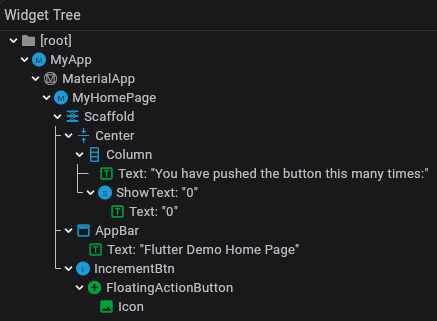
but we still need save count in _MyHomePageState, diliver count to ShowText, get a option callback to IncrementBtn. If there were many data in this page, this would be a huge disaster.
So we can use InheritedWidget to share data.
1
2
3
4
5
6
7
8
9
10
11
12

class ShareCountWidget extends InheritedWidget {
  const ShareCountWidget(this.count, {super.key, required super.child});

  final int count;

  static ShareCountWidget? of(BuildContext context) {
    return context.dependOnInheritedWidgetOfExactType<ShareCountWidget>();
  }

  @override
  bool updateShouldNotify(covariant ShareCountWidget oldWidget) => oldWidget.count != count;
}
Even a child widget that is decorated with const will be updated just like any other widget.
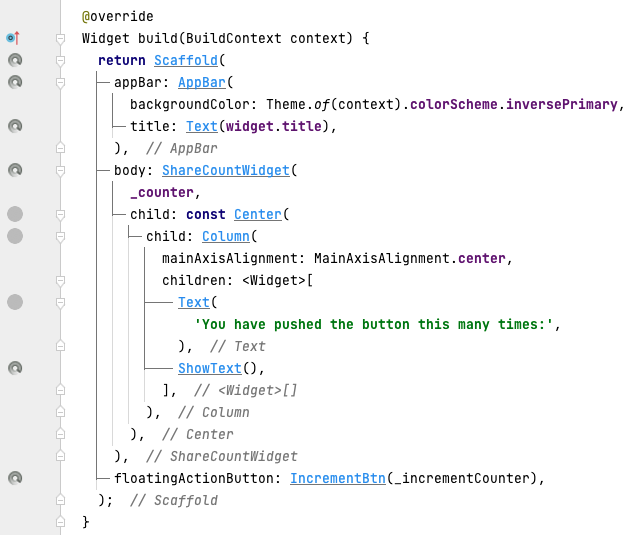
It help us to sharing data and update widget, but still need us to create state to save data.
Principle
InheritedWidget corresponds to InheritedElement.
1
2
3
4
5
6
7
8
9
10
11
12
13

class InheritedElement extends ProxyElement {
  InheritedElement(InheritedWidget super.widget);

  final Map<Element, Object?> _dependents = HashMap<Element, Object?>();

  @override
  void _updateInheritance() {
    assert(_lifecycleState == _ElementLifecycle.active);
    final PersistentHashMap<Type, InheritedElement> incomingWidgets =
        _parent?._inheritedElements ?? const PersistentHashMap<Type, InheritedElement>.empty();
    _inheritedElements = incomingWidgets.put(widget.runtimeType, this);
  }
}
_dependents is used to record which Elements depend on its data.
1
2
3
4
5
6
7
8
9

abstract class Element extends DiagnosticableTree implements BuildContext {
    PersistentHashMap<Type, InheritedElement>? _inheritedElements;
    Set<InheritedElement>? _dependencies;

    void _updateInheritance() {
        assert(_lifecycleState == _ElementLifecycle.active);
        _inheritedElements = _parent?._inheritedElements;
    }
}
_inheritedElements is from it’s parent. If current Element is InheritedElement, it will add itself to it.This approach has the benefit that adding a child element will not affect the parent element.
_dependencies is used to record it’s dependence. When it removed from the ELement tree, remove itself from InheritedElement._dependents.